
Operating a TinyS3 cluster
A task-oriented runbook for running TinyS3 in production: choosing and defining a topology, watching its health, and recovering from disk and node failures without losing data. For how distributed mode works internally, see Distributed mode; this guide is the operator's side of it.
Golden rules
- Never lose more failure domains at once than your parity budget tolerates — and when replacing hardware, do it one node at a time, waiting for healing to finish between each.
- A replacement node must come back with the same address and cluster config as the one it replaces, or it rejoins as a stranger and heals nothing.
- Bring nodes up together — a node waits for a majority of the cluster before it serves.
1. Choosing a topology
| Topology | Survives | Storage overhead | Use when |
|---|---|---|---|
| Single-node, simple | nothing (one disk) | none | dev, tests, ephemeral |
| Single-node, erasure (multi-disk) | up to parityShards disk losses on the host | parity/(data+parity) | one box, many disks, no network HA |
| Multi-node | up to parityShards-worth of node loss | same | HA across machines |
| Multi-node, multi-rack | a whole rack (power/switch/AZ) | same | rack/AZ fault isolation |
| Multi-pool | as each pool; grow/shrink online | per pool | scaling capacity over time |
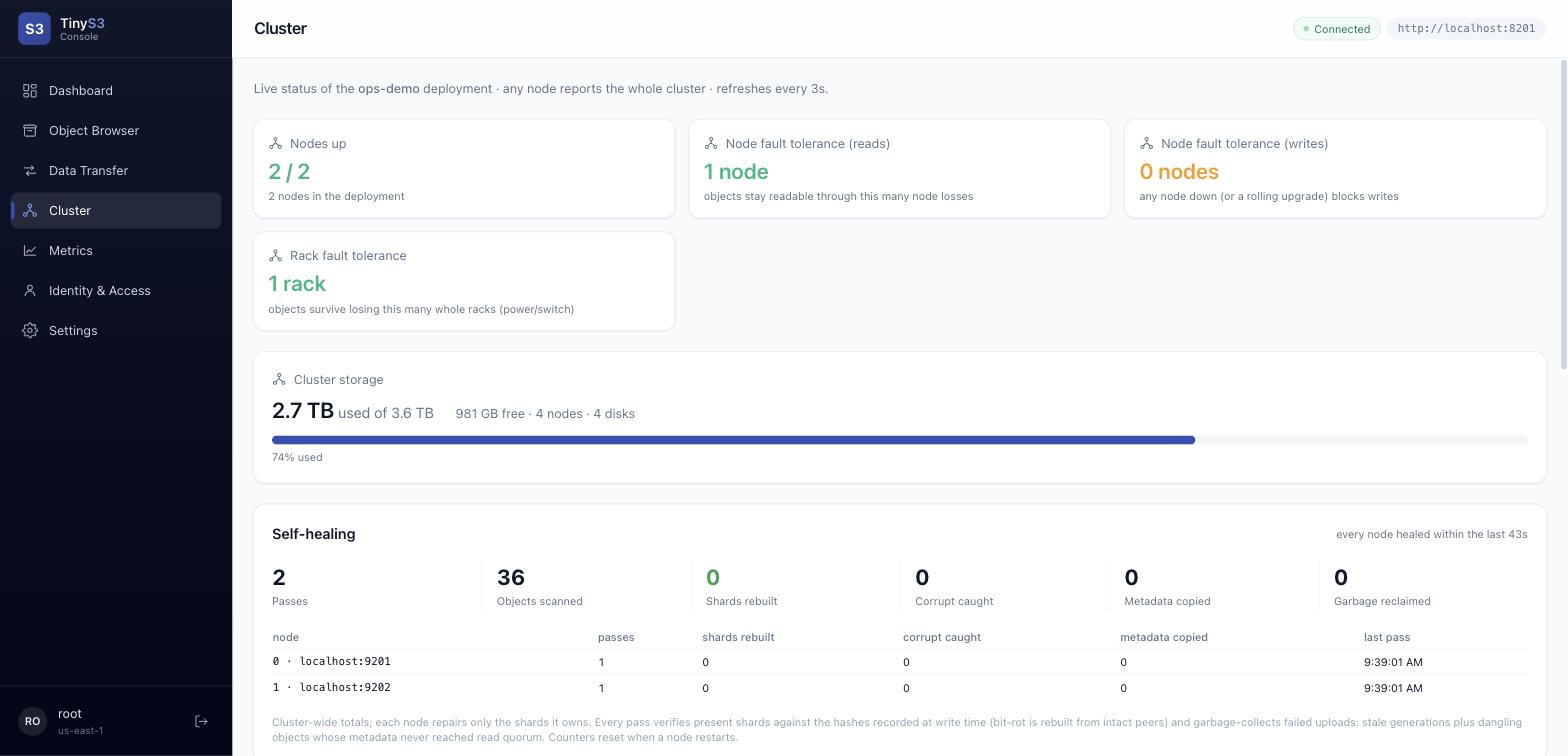
The fault-tolerance envelope is a function of the erasure scheme and how shards spread across failure domains. The boot log prints yours on startup, and the console's Cluster page shows it live.
2. Defining each topology
Every node runs the same binary. In a cluster, the whole cluster block is identical on every node — only self and the node's local storage.erasure.disks differ. Placement is a deterministic function of the config, so there is no separate "cluster init" step.
Single-node, multi-disk erasure
yaml
storage:
  mode: erasure
  erasure:
    dataShards: 4
    parityShards: 2          # tolerates 2 of the 6 disks failing
    disks: ["/data/d1","/data/d2","/data/d3","/data/d4","/data/d5","/data/d6"]
Multi-node
yaml
cluster:
  name: "prod-1"
  nodes: ["node1:9000","node2:9000","node3:9000","node4:9000"]   # same list & order everywhere
  self: "node1:9000"                                             # only this differs per node
storage:
  mode: erasure
  erasure: { dataShards: 8, parityShards: 4, disks: ["/data/d1","/data/d2","/data/d3"] }
Multi-node, multi-rack
Add racks — one entry per node, same order as nodes:
yaml
cluster:
  name: "prod-1"
  nodes: ["r0n1:9000","r1n1:9000","r2n1:9000","r0n2:9000","r1n2:9000","r2n2:9000"]
  racks: [0, 1, 2, 0, 1, 2]     # nodes 0,3 → rack 0; 1,4 → rack 1; 2,5 → rack 2
  self:  "r0n1:9000"
storage:
  mode: erasure
  erasure: { dataShards: 4, parityShards: 2, disks: ["/data/d1","/data/d2"] }
Omit racks and every node is its own failure domain (node-level placement).
Multi-pool
Each pool is an independent placement domain with its own nodes and racks; declare cluster.pools instead of cluster.nodes. See Server pools.
The sizing rules
- Slot budget:
nodes × disksPerNode ≥ dataShards + parityShards(enough slots to place a stripe). With8+4on 4 nodes, use 3 disks/node = 12 slots. - Write quorum =
dataShards + 1shard acks; read quorum =dataShardsshards. - Rack survival needs
ceil(totalShards / rackCount) ≤ parityShards— e.g.4+2needs ≥ 3 racks to survive one rack loss. - Write availability during a restart needs node write-fault-tolerance ≥ 1: a 2-node cluster cannot take writes while either node is down, so it cannot be upgraded without write downtime — use ≥ 3 nodes in production.
3. Bringing the cluster up
Start every node (tinys3 server --config <node>.yaml) at roughly the same time. Each node waits up to 90s for a majority (floor(nodes/2)+1) of peers to be reachable before it begins serving — this boot barrier is what prevents a split-brain minority from accepting writes. If you start only a minority, they will sit waiting; start enough together.
Verify health before sending traffic:
- The boot log prints the erasure scheme, set count, and the node/rack fault-tolerance envelope.
GET /rest/api/v1/cluster(or the console's Cluster page) shows every node's reachability, quorum status, and rack fault tolerance.
4. Monitoring
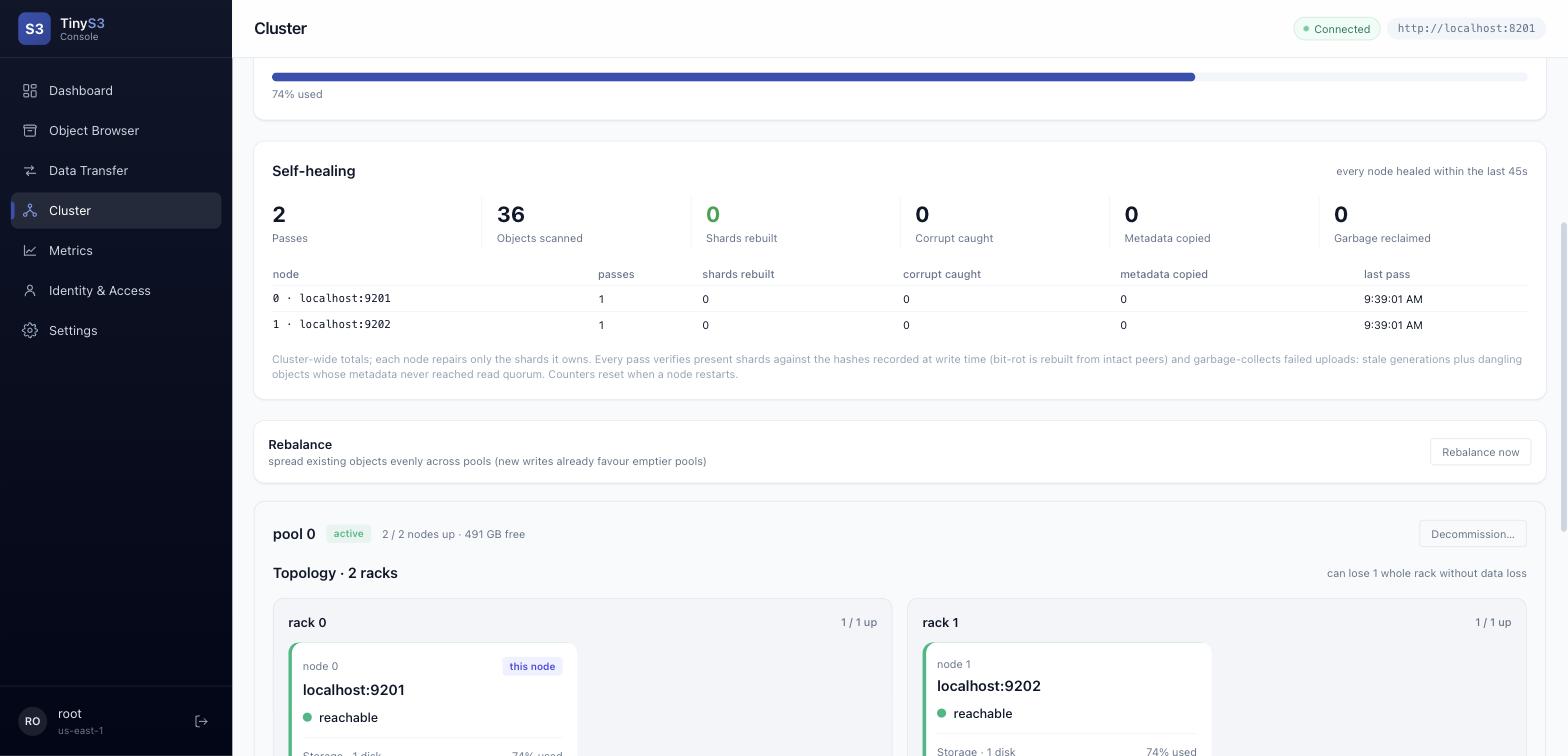
Point a Prometheus scrape at /tinys3/metrics (see features). Also available: /tinys3/health/live (liveness — process up, always 200), /tinys3/health/ready (readiness — 200 only when storage can actually serve requests; 503 when the data volume is unmounted or write quorum is lost, so a load balancer stops routing there), and GET /rest/api/v1/cluster/healing (heal telemetry). Alert on:
| Signal | Metric / source | Why |
|---|---|---|
| Node down | tinys3_cluster_nodes_up < total | lost redundancy |
| Lost write quorum | tinys3_cluster_has_write_quorum = 0 | writes are failing (503) |
| Rack tolerance gone | tinys3_cluster_rack_fault_tolerance = 0 | a rack loss now risks data |
| Capacity | tinys3_storage_used_bytes / _total_bytes | plan expansion before full |
| Unrecoverable objects | cluster healing telemetry | objects below read quorum — act now |
| Heal backlog / disk offline | healing stats, disk statuses | a second failure may cross quorum |
5. Replacing a failed disk
A single failed disk is the easy case — healing rebuilds it in place.
- Confirm the cluster still has read quorum for the affected objects (it does if you've lost fewer than
parityShardsslots of any stripe). - Physically replace the disk and mount a blank disk at the same path in that node's
storage.erasure.disks. - Restart the node. Its healer lists the cluster's objects and rebuilds every shard it owns onto the blank disk, reading a quorum from the other slots — reads keep serving throughout.
- Verify before moving on: watch heal telemetry until a pass completes with 0 unrecoverable and the disk shows online with data. Only then consider the disk restored.
The cluster healer runs every -Dtinys3.cluster.healIntervalSeconds (default 60; set 0 to disable). To rebuild a large blank disk faster, you can lower the interval on that node.
6. Replacing a failed node
The mechanism is the same healing loop, but the preconditions are safety-critical — get them wrong and you either lose data or the node never rejoins.
Before you start: only replace one node at a time, and only if the cluster still has read quorum without it. If more nodes are down than your parity budget tolerates, you are already in a data-loss window — restore the existing nodes (below) before replacing anything.
- Provision the replacement at the same address (
host:port) as the dead node, with the identical cluster config (samenodes,racks,selfpointing at that address, same secret/TLS). The config's format hash must match, or the node rejoins as a different slot-owner and rebuilds nothing. - Give it blank disks at the same paths.
- Start it. Because it comes up at the same identity, it owns the same slots; its healer re-derives its entire shard set from the survivors, one object at a time, while reads keep serving and new writes already land on it.
- Verify before touching the next node: watch heal telemetry until a clean pass reports 0 unrecoverable and the node's disks show full. The node is only truly rejoined then.
Recovering several downed nodes: bring back enough of them together to clear the 90s boot quorum (a lone node waits forever for a majority). Then let healing catch each up.
TinyS3 heals shards within an erasure set, never whole-disk replication — it never copies one node's disk onto another. A replacement is repopulated shard by shard from the surviving quorum, so there is no "resync source" to choose and no risk of copying a stale disk.
7. Expanding capacity
Add a pool to grow (see Server pools): existing objects never move, and new writes bias toward the emptier pool automatically. On a write-heavy workload that evens out on its own. To move existing data off a pool, decommission it (§8) — that is the only operation that migrates already-written objects between pools.
8. Decommissioning (retiring a pool)
To remove a pool, decommission it — the pool stops taking new writes but keeps serving reads while a background job migrates every bucket resident on it (pinned or not) to the emptiest surviving pool (POST /rest/api/v1/pools/{name}/decommission, keyed by pool name, or the pool card in the console):
Standalone multi-pool only. Decommission is exposed only on a single-node multi-pool deployment. It is not available in a multi-node cluster, where per-node pool state is not yet propagated — the endpoint is not registered there.
- Refused unless the surviving pools have capacity (with headroom) and keep their own rack fault tolerance.
- Each bucket is copied to the target and verified (size + CRC) before the source copy is deleted, then the bucket's pool pin (bucket pool affinity) is rewritten to the target pool. Decommission is the sanctioned way a pinned bucket moves; pinned buckets are migrated like any other, not skipped.
- New writes to a bucket whose pool is draining are refused until that bucket's pin has been rewritten to the target; reads keep working throughout.
- Progress at
GET /rest/api/v1/pools/{name}/decommission(state plus buckets/objects/bytes done and the planned totals). There is no cancel operation. - Resume is manual, not automatic: an interrupted drain is not resumed on boot — re-issue the same
POSTto continue (the migration is idempotent and copies only what has not moved yet). The per-pool state (ACTIVE/DECOMMISSIONING/DECOMMISSIONED) is persisted, so a decommissioned pool does not revert to active across a restart while it is still in config. - When it reports
DECOMMISSIONED, remove the pool fromcluster.pools.
9. Rolling upgrades and restarts
Restart one node at a time, waiting for it to rejoin (heal telemetry clean) before the next. This requires write-fault-tolerance ≥ 1 (≥ 3 nodes), or writes stall while a node is down. Reads continue throughout as long as read quorum holds.
10. Failure & recovery reference
For a 4 × 3, 8+4 cluster (one node holds 3 of 12 shards):
| Event | Reads | Writes | Operator action |
|---|---|---|---|
| 1 disk lost | continue | continue | replace disk (§5) |
| 1 node down | continue | continue | restart it; healing catches it up |
| 2 nodes down | continue (≥ dataShards reachable) | fail quorum → 503 | restore a node to regain write quorum |
| whole rack down (rack-aware) | continue | continue where quorum holds | restore the rack; healing repairs |
| minority partition | continue | minority takes no writes (no split brain) | heal the network; minority rejoins |
| below read quorum | some objects unreadable | — | restore hardware; objects rebuild once quorum returns |
11. Troubleshooting
- Cluster won't form / nodes hang at boot — fewer than a majority are reachable; the boot barrier is holding. Start enough nodes together.
- Writes return 503 — write quorum lost (too many nodes/shards down). Restore a node.
- A replacement node heals nothing — its address or cluster config differs from the node it replaced (format-hash mismatch); it must reuse the same identity.
- Persistent unrecoverable objects — those stripes are below read quorum on every node; they return once enough hardware is restored, and are surfaced (not silently retried forever) in the healing telemetry.
- Decommission won't start — the surviving pools lack capacity (with headroom) or would lose rack fault tolerance, or there is only one pool. Free space or add a pool, then retry.
- A drain was interrupted (pool stuck DECOMMISSIONING) — it is not resumed automatically; re-issue the same
POST /rest/api/v1/pools/{name}/decommissionto finish it (the migration is idempotent).
12. IP blocklist recovery (self-lockout)
The front-door IP blocklist bans source IPs/CIDRs before routing or auth. Three safeguards guarantee a bad ban is always recoverable:
- Loopback is never blocked. A request whose resolved client IP is a loopback address (
127.0.0.0/8,::1) bypasses the blocklist entirely, so an operator on the host itself can always reach the admin API to remove a ban — e.g.curl -X DELETE "http://127.0.0.1:8000/rest/api/v1/blocklist?cidr=10.0.0.0/8" -H "X-API-Key: …" -H "X-API-Secret: …". - Kill-switch. Set
TINY_S3_BLOCKLIST_DISABLED=true(orsecurity.blocklistDisabled: truein the config) and restart. The blocklist is then neither constructed nor enforced — an out-of-band lever when even loopback access is unavailable. Re-enable once the offending entry is gone. - On-disk recovery. Bans persist as a single document in the quorum doc-store under
blocklist/(blocklist.json). Deleting that document (with the server stopped) clears every ban; on next boot the blocklist starts empty. A load error at boot is non-fatal: the server fails open, logs a warning, and starts with an empty blocklist rather than refusing to boot.
Removing a ban from the console (or via DELETE /rest/api/v1/blocklist?cidr=<cidr>) takes effect cluster-wide within seconds — no restart. The console warns before you add a ban that would include your own current address.
13. IP allowlist recovery (self-lockout)
The front-door IP allowlist is default-deny: when enforcement is on, only listed source IPs/CIDRs reach the server. Because that can lock everyone out, it is inert until you explicitly enforce it, and the same safeguards as the blocklist apply, plus an enable-time guard:
- Inert until enforced. Adding entries does nothing on its own; enforcement is a separate, persisted flag. The admin API refuses to enable enforcement unless your own resolved address is already covered by an entry (and the list is non-empty) —
force=trueoverrides. The console shows whether your address is covered and hard-warns before enabling an uncovered list. - Loopback always passes, even under an enforced allowlist, so a local operator can always reach
PUT /rest/api/v1/allowlist {"enabled": false}to stop enforcing. - Kill-switch.
TINY_S3_ALLOWLIST_DISABLED=true(orsecurity.allowlistDisabled: true) then restart — the allowlist is neither constructed nor enforced. - On-disk recovery. The flag + entries persist under
allowlist/(allowlist.json) in the quorum doc-store; delete that document (server stopped) to clear enforcement. A boot load error fails open (starts inert), never denying everyone.
Behind a reverse proxy, set security.trustedProxies (a list of the proxy CIDRs, or env TINY_S3_TRUSTED_PROXIES) before enforcing. Otherwise every request resolves to the proxy's IP, and an enforced allowlist would admit or deny the whole world as one. Only forwarding headers (X-Forwarded-For / X-Real-IP) from a trusted-proxy peer are honored; a direct client can never spoof its source.